
Substack Made Simple Part III: Your 10-Minute Fix – How to Rescue Your Hidden Substack Posts Still Hiding From Search
Simple tweaks that help search engines understand your posts so readers can find them.


Most writers assume something logical because why wouldn’t we:
We publish a post on Substack.
The post exists on the internet.
People should be able to find it in search.
Right? Not exactly. Sorry.
The internet is less like a bulletin board and more like a giant library. Millions of shelves. Billions of pages. Search engines are like librarians. But if a book has no clear title, no summary, no tags/keywords, and no category, the librarian has no idea where to shelve it (no offense to actual superhero librarians).
Substack posts work the same way.
💥 Gratitude to my exclusive advertising sponsor, the always-free Booklinker, and the paid tool, GeniusLink. I love both💥 (affiliate link).
Search engines and AI tools need clues to understand what a page is about before they show it to readers. In simple terms, search systems look for clear signals that explain a page's topic, such as titles, summaries, headings, and links.
Search engines aren’t judging our writing; they’re just trying to figure out where to shelve it. Tags, categories, alt-text, etc., are the labels.
First: Yes, Substack Posts Can Show Up in Search Engines
Substack posts (aka, articles, aka newsletters) are public web pages, which means search engines can scan them the same way they scan other sites.
Google (still the largest search engine) explains the basics of how search engines understand web pages in its free SEO starter guide. Search systems are basically trying to answer three questions about every page they find:
What is this page about? Who might want to read it? How does it connect to other pages on the internet?
When those answers are clear, your post becomes much easier to discover.
How a Substack Post Travels Into Search
Think of discoverability as a chain of signals:
You publish a post
        ↓
Substack creates a web page
        ↓
Search engines scan the page
        ↓
They read clues like the title and description
        ↓
The page gets added to a giant search index
        ↓
Readers can now find it through search
If a page doesn’t provide enough clues about its topic, search engines may still index it, but they may not know when to show it to readers. Clear titles and summaries help the system connect your post to the questions people are asking.
Sometimes it takes a few days or weeks for search engines to scan and index a page, but once a post is indexed, it can continue showing up in search results long after it was published.
The 10-Minute Fix: 5 Small Things to Check Now
If one of your posts feels invisible, these are the easiest tactics for you to review. Pick one post you wish had more eyes on. Just one.
1. Check the Title
Your title is one of the strongest clues search engines use. Compare these two examples. Vague title: Thoughts on Discoverability. Clear title: Why Your Substack Posts Aren’t Being Found.
The second title makes the topic obvious and captures our attention. Be specific. Vague titles get you the same thing writing vague test essays did in high school - nowhere fast.
2. Add an SEO Description
Substack gives you a small box to write a short description of your post. You’ll find it in the post/article editor: Click Continue at any point, in the top right of the screen (on the web), while composing your post, as seen here on slide one.
Then scroll down to Social Preview (you will need to add a featured image). Click on the photo, and a box pops up, where you can edit/add your meta description.

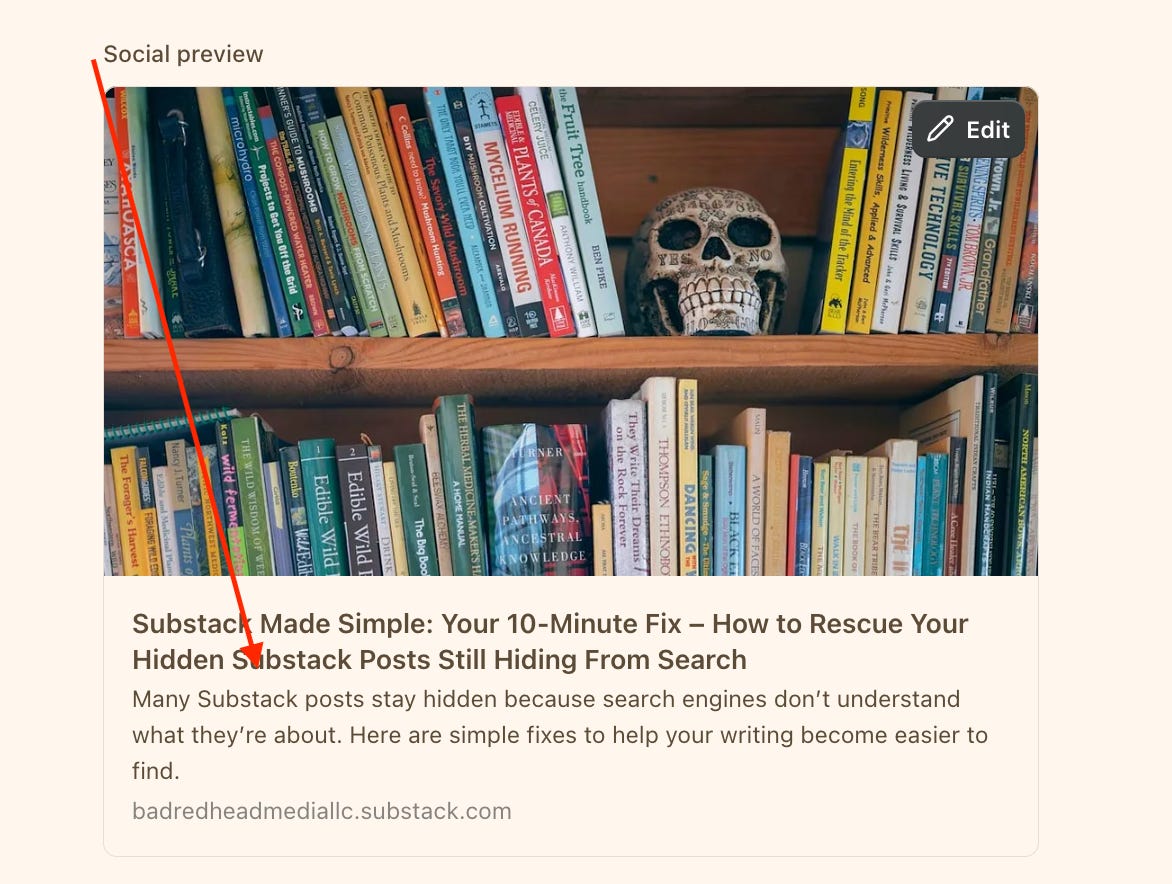
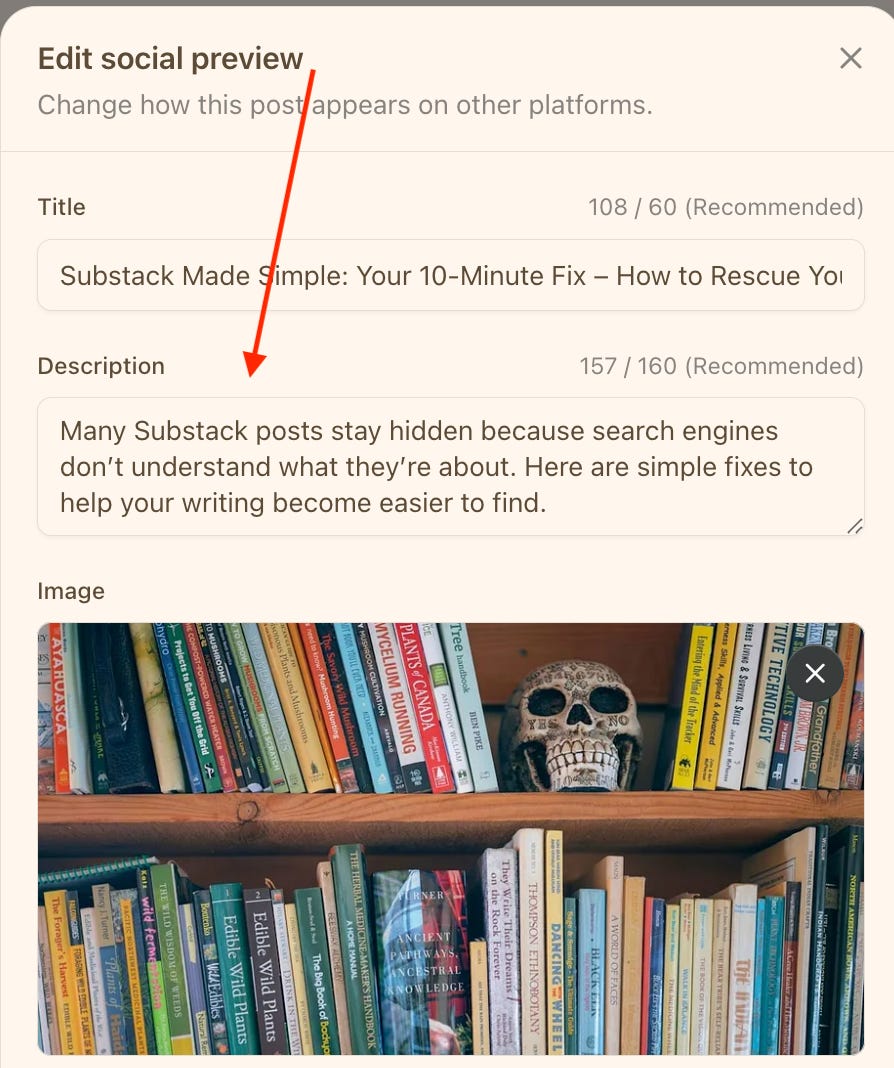
If you look at the title in the above visual, it gets cut off. Too long. So here’s my fix, below. Notice, if you scroll back up to the top, the original title of this post hasn’t changed.
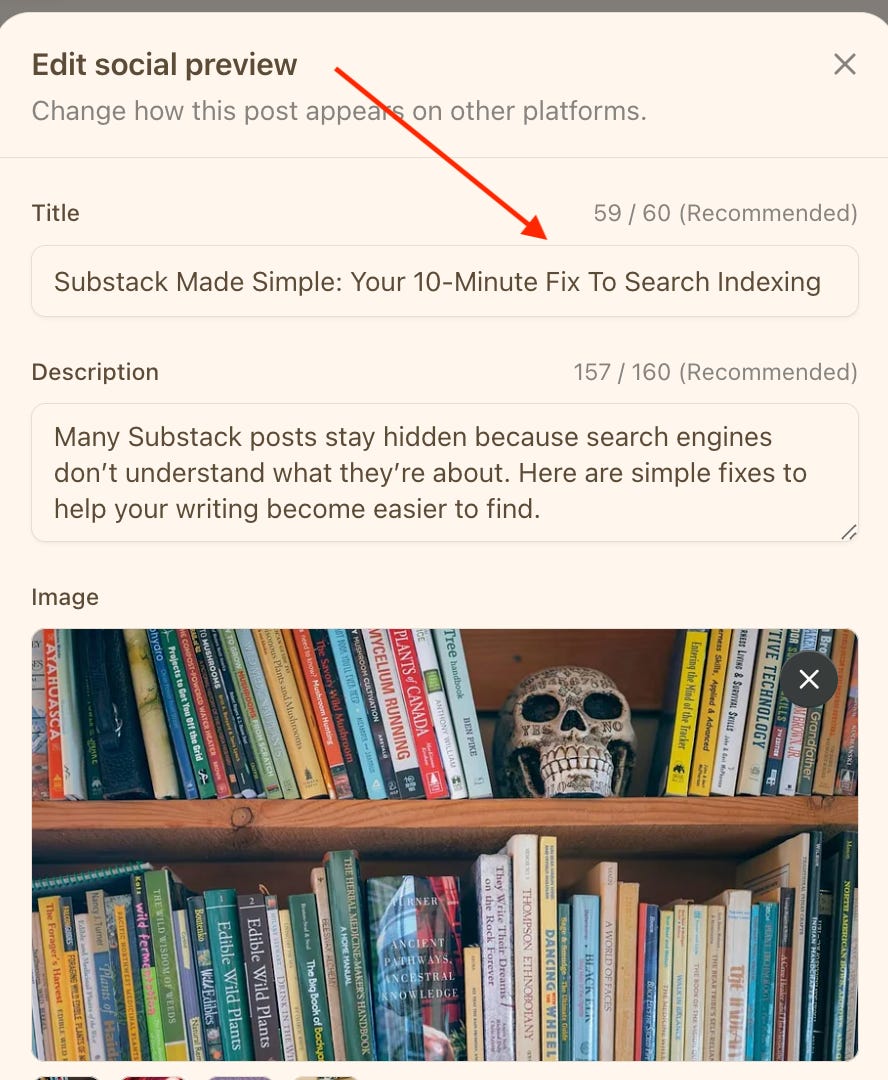
3. Check Your Publication Description
Your publication description helps search systems understand what your newsletter is about. You can find it here: Dashboard → Settings → Publication Short Description. Here’s mine:
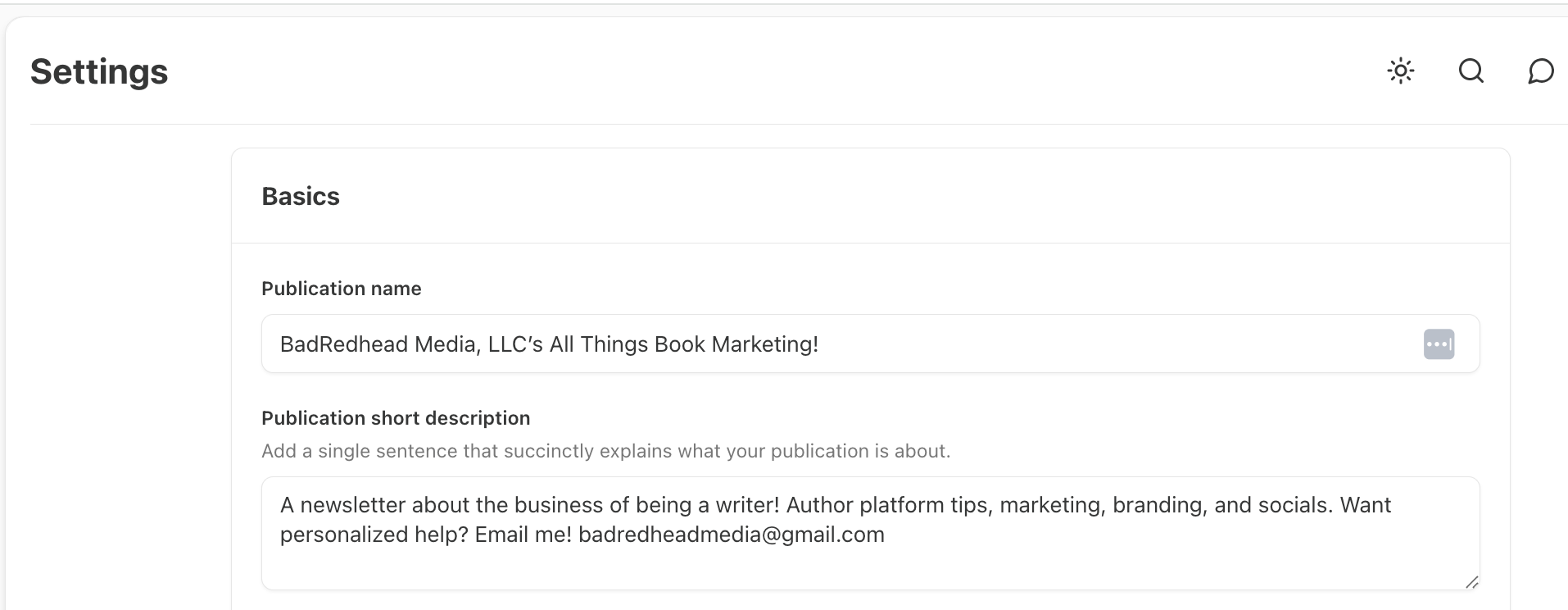
Many writers leave this blank or fill it with vague musings, like Thoughts on writing and creativity, when a clearer version might be: Practical book marketing, strategy, and insights for writers.
This small but crucial task gives both readers and search engines a much clearer signal. Again, don’t be vague.
4. Use Post Tags
Post/article tags are simply topic labels. Be sure to include your two publication categories in every post as tags as well; e.g., mine are Education (category first position, which Substack uses for leaderboards) and Literature. (The only ‘writing’ categories here are Literature and Fiction, just FYI.)
For example:
Substack strategy
Writing Memoir
Book marketing
Romance tropes
Tags help organize your individual posts. I’ve not found evidence that tags increase discoverability, but if anyone knows, please share.
5. Link to Older Posts/Posts by Others
Link to your own articles (aka internal links) and/or articles by others you’ve enjoyed. Just grab the URL (copy), and Substack embeds it for you (paste).
For example, I just copied the URL from my most popular post, and this pops up below, fully formatted and embedded. All I did was copy/paste the URL.

Search engines use links to understand how pages relate to each other. Readers benefit too, because they can explore more of your work. It’s a little like leaving breadcrumbs throughout your archive.
I also suggest linking to articles or publications by others on similar topics, or just share what you’ve enjoyed, aka, give back. My favorite reads this week came from Kristina God, HVR, Angelo Alfano FNP, PMHNP, Jeff Burgess, Today's Facts, Dr Alexandria Szeman, Andrew D. Kaufman, Charles Levin, and Write Publish Sell.
Finally, adding external links helps build credibility, cross-promote content, and potentially monetize through affiliate links if that’s your thing, as Substack does not penalize for off-platform links. Don’t go overboard, though. Too many links distract from your copy.
What About AI Search? It’s Here.
These days, readers also discover information through AI tools. Many of those systems still rely on information from web pages to understand topics and answer questions. So the same signals still matter:
Clear titles
Helpful summaries
Organized content
When your posts clearly explain the topic, they’re easier for both search engines and AI tools to understand.

About Discoverability
Most writers aren’t invisible because our work is bad, but because the internet is enormous, and search systems need a little help understanding what each page explains.
Clear titles. Short descriptions. Helpful tags. Links between related posts. Think of these as road signs: they don’t change the road, but they make it much easier for readers to find you.
Substack Made Simple Series
Substack can feel confusing when you first start exploring the platform. There are settings, features, and little mechanics that aren’t always obvious. Then there are publication settings, which differ from reader settings. I mean, come on, Substack.
If you’re trying to figure out Substack, these posts may help - I created a free Section within my publication specifically for Substack tips!
If you’re new here, welcome. I write about the practical mechanics behind book marketing, newsletters, social media, branding, and the platforms writers use every day. You’re always welcome to subscribe, free or paid.
What are your thoughts on this stuff? I’d love to hear from you. Confused? Give me a jingle at badredheadmedia@gmail.com. 🌻
Thank you for illuminating the description box and how to use it! Super helpful!
Thank you for this very helpful post.