
Substack Made Simple Part II: Why Your Posts Aren’t Being Found (And Small Fixes That Help)
How small setup choices affect our discoverability and what to do about it


👉 Read Part I here.👈
If you’re publishing on Substack and wondering why your posts feel invisible, you’re not doing anything wrong. You probably haven’t dug deep into all the features because there are a lot.
If you’re not but want to learn more, I’m glad you’re here. 🤗 Much of this also applies to whatever paid newsletter service you’re using.
I’ve been writing weekly here since 2023, and I still learn something new all the time. This post isn’t about growth hacks or gaming algorithms. It’s about making your writing visible to the platform it lives on.
Most writers aren’t failing at Substack. They’re skipping a few small setup steps that Substack doesn’t explain well and have changed quietly over time.
Bookmark this for later.
💥 Gratitude to my exclusive advertising sponsor, the always-free Booklinker, and the paid tool, GeniusLink. I love both💥 (affiliate link).
This post shows you exactly where to click and what to fill in so Substack can understand and surface your work. That applies whether you’re writing essays, memoir, poetry, cultural commentary, humor, fictional series, or how-to posts.
👉 Read Part I here👇

Start Small 🧭
If you don’t have a publication yet, you will need to create one to post and gain subscribers. How-to right here:
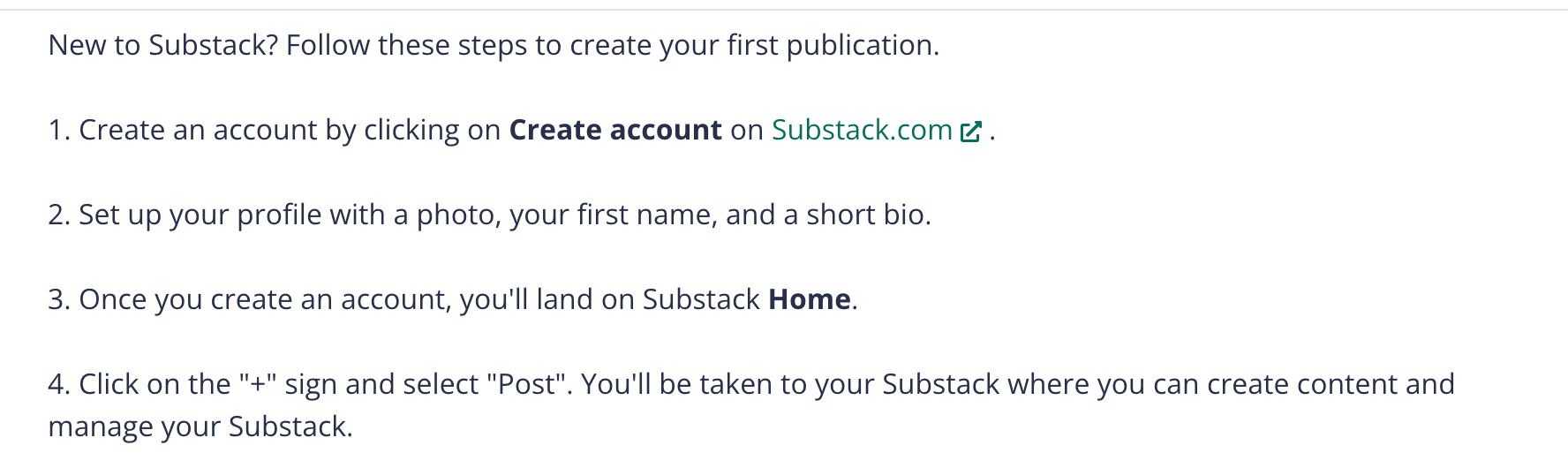
Open one post. Any post. Posts are in your publication. Draft or published. Don’t try to fix everything today. That’s how we end up in analysis paralysis. I see you. 👀
Where To Find Settings
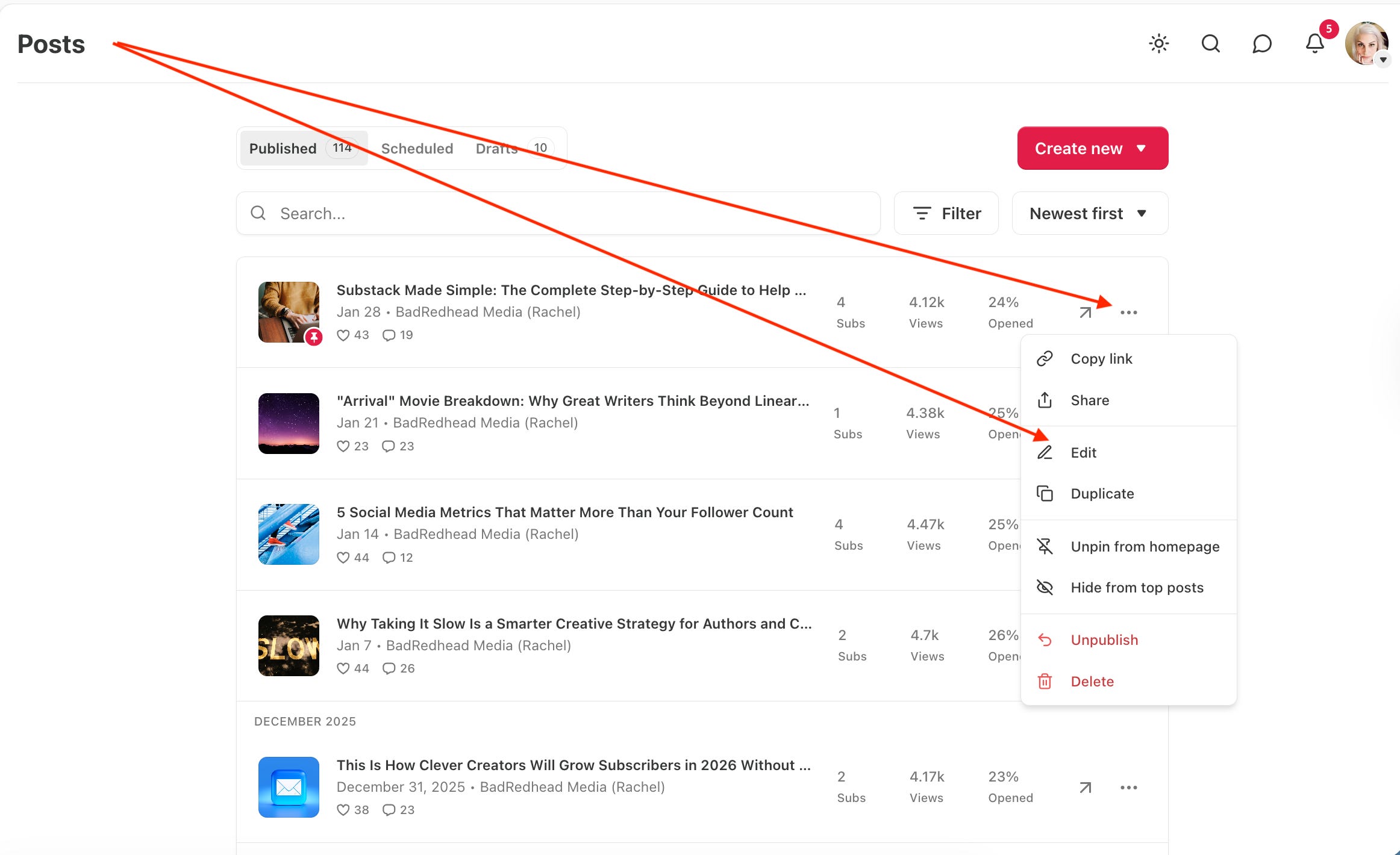
On your publication dashboard, click Edit on the post (or go to the post itself). You’ll find that in the … (elipsis) on the top right of the post. You can also go to your Posts list (as shown below), click the ellipsis, and edit will appear as an option.
⚙️ Look for the gear icon in the editor (where you compose). As of now, it appears in the bottom-right corner (on desktop). See the red arrow below.
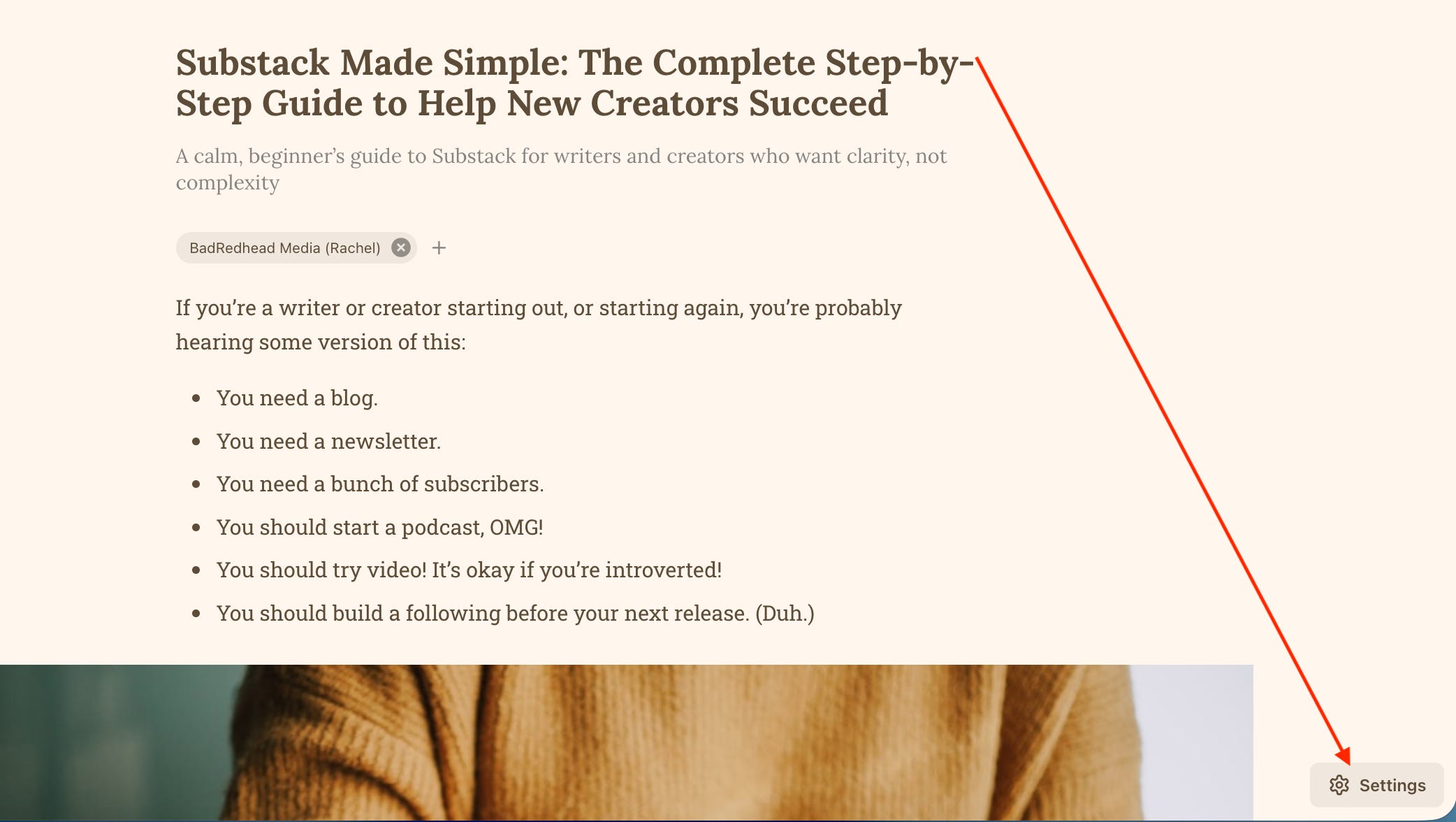
That gear is where the important stuff lives. Click on it. I promise, nothing will explode.
TIP: If you don’t see a gear icon, you’re editing a Note, not a Post. Notes are for conversation - think social media. Posts get grouped, indexed, sent to your subscribers, and discovered. Notes do not. (I like Notes for growth and interaction, but that’s another discussion.)
💡 If you’re thinking, “I never would’ve found this setting,” you’re right. I didn’t know til I read about it. Substack has moved this more than once and doesn’t label it clearly.

Tags (aka Keywords): One of Several Tools That Matter Most
Inside that gear panel, you’ll see Tags.
Tags are your keywords or key phrases for only that one post. They tell Substack what your writing is about and which pieces belong together. (Think buckets, or verticals, if that terminology makes sense to you.) Tags help organize your individual posts.
Add three to five tags you will reuse. Plain language is best, like writing, life, Substack tips, personal essays, and author marketing. Whatever genuinely fits your work.
💥 Be sure to include your two categories (more below) in each post’s tags. 👈
You’re leaving breadcrumbs. When posts include tags, they create paths for readers to follow or subscribe to, and show The Substack Gods where readers are spending time.
What Substack does not say is that tags function like global discovery hashtags. They frame them as tools for organization and reader navigation. If you know more, please do share! I found this article super helpful.
Official Substack explanation here.
Publication Categories: Crucial, And Changeable
Categories live at the publication level, not the post level. We can choose two.
Go to Publication Settings → Basics, choose a primary category, and a secondary one if applicable. The categories I have set for this publication are Literature and Education.
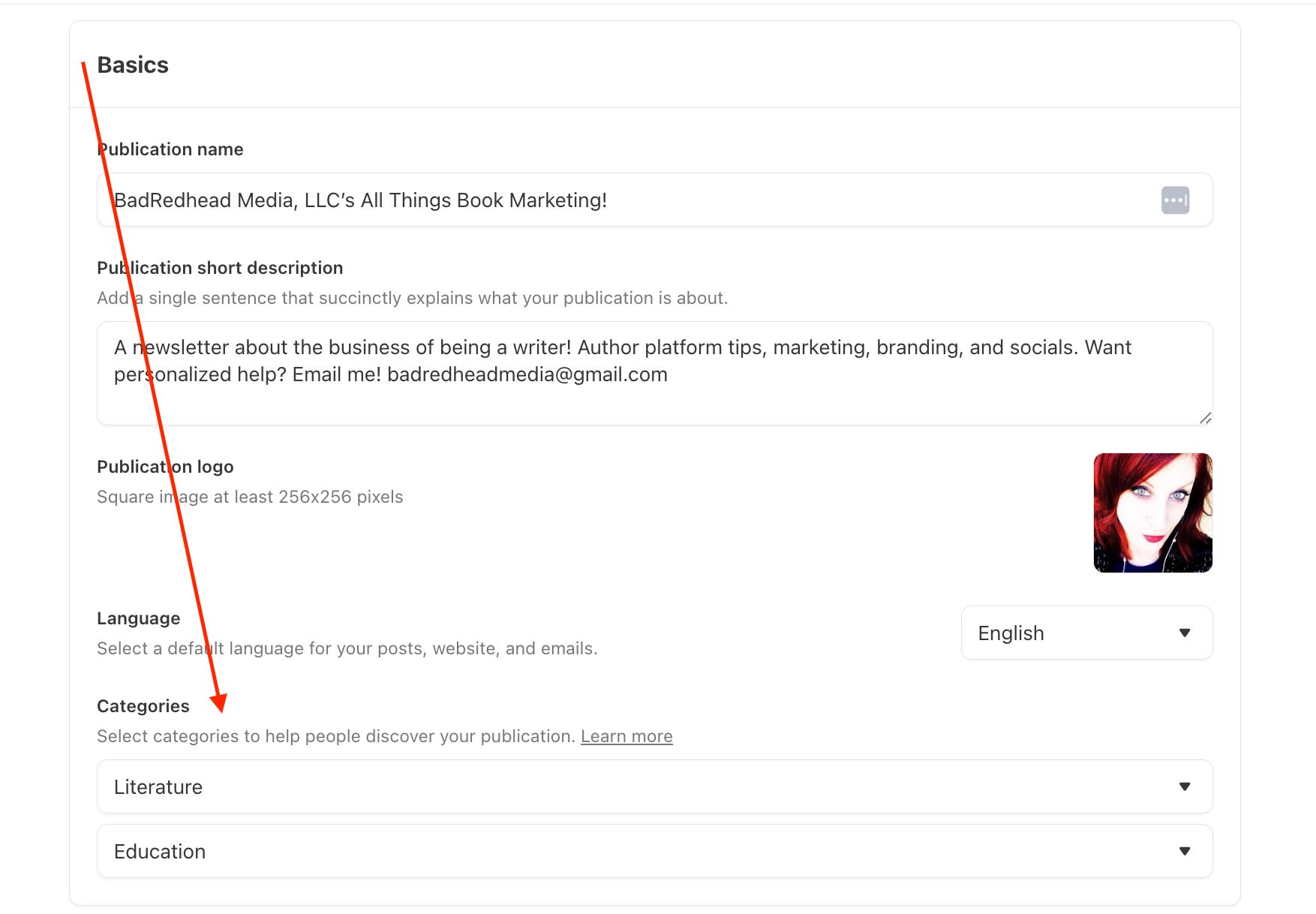
These categories tell Substack what your publication is so it can group and surface your work. They’re not permanent, meaning you can change them as your focus evolves. Updating categories isn’t a failure. It’s maintenance.
Here’s Substack’s official guide.
👉💥 Note: Your PRIMARY category is the one you will (hopefully) be ranked in (just learned this). I’ve only ranked once in Literature. I wish there were a Marketing category. I don’t change categories often, but I do occasionally. I’ve switched to Education first. We shall see…
💥 Update! I’ve ranked twice in Education since publishing this, and I've updated my main category to Education, not Literature. Woohoo.
Most Substack growth issues are labeling issues, not writing issues.
Titles Are Invitations, Not Promises
Look at your post title and ask yourself this one question: If someone saw only this title, would they know what the post is about?
That’s it. This works whether you’re explaining something, telling a story, or exploring an idea.
Example:
“Some Thoughts on Substack” doesn’t give a reader much to grab onto.
“How Substack Groups Your Writing (And Why Tags Matter)” does.
Or for an essay:
“On Tuesdays” is vague.
“On Tuesdays, I Think About Starting Over” gives the reader a doorway.
If your title already does this, leave it alone. If it doesn’t, adjust slightly. Clarity first. Cleverness second.
Follow 👉 Claire Diaz-Ortiz for tons of great Substack tips. Kristina God, and Self-Publishing with Dale are also incredibly helpful.
The First Paragraph Sets the Tone
Read your opening paragraph. If it doesn’t clearly orient the reader, add one sentence at the top that does. That sentence can explain, reflect, or invite.
For example:
“This post reflects on how routine and memory shape my week.”
Or:
“This post explains how small setup choices on Substack affect discoverability.”
You can keep your original opening. This sentence is just a signpost.
👉 Optional, But Super Important: The SEO Description 🔍
Back in the gear panel, you’ll also see the SEO description (more below).
This is the short summary that search engines and previews use. If you leave it blank, Substack pulls a sentence, usually the subtitle or first sentence. If you want to fill it in, write one plain-language sentence describing what the post is and who it’s for.
No jargon. No pressure. Include your main tag/category if possible.
Google explains this clearly. Easy answer: Before you click publish, click on your ‘social preview’ (slide one), and when that opens, you can edit your description (slide two). If you haven't done it yet, click Edit on your post to update it.


What All of This Quietly Does ✨
Your posts stop floating around like lost socks. Older posts quietly start doing useful work instead of collecting dust. Make those older posts earn their keep. No tricks. No hustle. Just clarity.
One Guideline I Find Helpful
If you can finish this sentence, Substack can more easily place your post (which applies to anywhere you write online as well):
“This post is about ___ for people who care about ___.”
This tactic works for essays, poems, fiction, reflections, guides, and stories. Not every post needs a problem to solve, and you don’t need to use those exact words. But ask yourself that question.
Your post and topic need to be about something specific. Make sure the answer appears in your title, tags, and opening paragraph.
That’s enough.
A Quickie Checklist 📝
Before you publish, or when fixing an old post (you can edit tags and descriptions on any/all published posts), ask yourself:
Is this a Post, not a Note? ⚙️
Did I add a few consistent tags, including my categories?
Are my publication categories accurate right now?
Does the title orient the reader?
After the first paragraph, does the reader know where you’re taking them? Do you?
That’s it. My entire “system.” Not a fan of ‘systems that work’ hype, but this one is easy enough to follow and makes practical sense. As my friend Jeff Burgess says, it worked for me!
‼️ If You Only Do One Thing…
Set your publication categories (closest fit choose first), and use consistent tags on your posts. If Substack doesn’t know what your writing is about, it can’t group, recommend, or surface it. Does this guarantee you will rank on a leaderboard? No, but it could help.
My Ask 💬
If this helped, try it on one post this week. If something still feels fuzzy, leave a comment and tell me where you got stuck. Please subscribe and recommend to a friend.
No one should feel bad for not knowing this. Substack just doesn’t explain it very well. If you want one-on-one, I’m available for hire. See my website or email me!
Your links to other tips, especially from Hello, Writer was eye opening. I’m making several ‘poor choices.’ The task for this week is to go through your list and work to improve my setup.
Thank you for this. I'm new here. This is definitely appreciated.